You, AI and a Close Deadline

This document shares my recent journey and insights from leveraging Large Language Models (LLMs) as a coding co-pilot, particularly in the context of integrating new vendor management features into an existing system. My focus has been on how to truly maximize efficiency, rather than just pushing harder, by embracing AI in my development workflows. I’m certainly no expert in this field; I’m simply sharing what I’ve learned through my experience after embracing AI as a co-pilot, especially with the ZIP integration, to speed myself up.
Context: For a while, I hadn’t held a very positive opinion about AI in coding. It wasn’t a philosophical opposition, but I struggled to see where it fit into my established workflow of macros, custom key mappings, and shortcuts. AI as a boilerplate generator didn’t immediately resonate, as I already had automation for that.
However, my recent experience with ZIP integration changed my perspective. We aimed to bring this integration into Sprinto, introducing two fundamentally new concepts: a proper vendor management suite into the existing models and the ability to PUSH data out. Before diving into ZIP, I warmed up with other integrations like Gitlab Vulnerabilities, Sentinel One, and Grafana, as I hadn’t touched integration code in over two years.
Typically, my delivery per integration took around two weeks. Much of this time was spent deciphering undocumented code and managing a high cognitive load, especially with the constant discovery of new code patterns across different integration modules. My teammates were already optimizing the integration data layer, and their prompt-writing patterns really enabled me to accelerate and deliver much quicker with AI’s help.
Cognitive Load: Pre-Post AI
Before AI, the initial phase of any integration required a lot of context-gathering—understanding how things worked, tracing patterns, and building a mental map. I’d eventually hit a point midway where things started to click and I could breathe a bit—but that was usually short-lived, as I’d soon realize the module needed to be connected to many other moving parts.
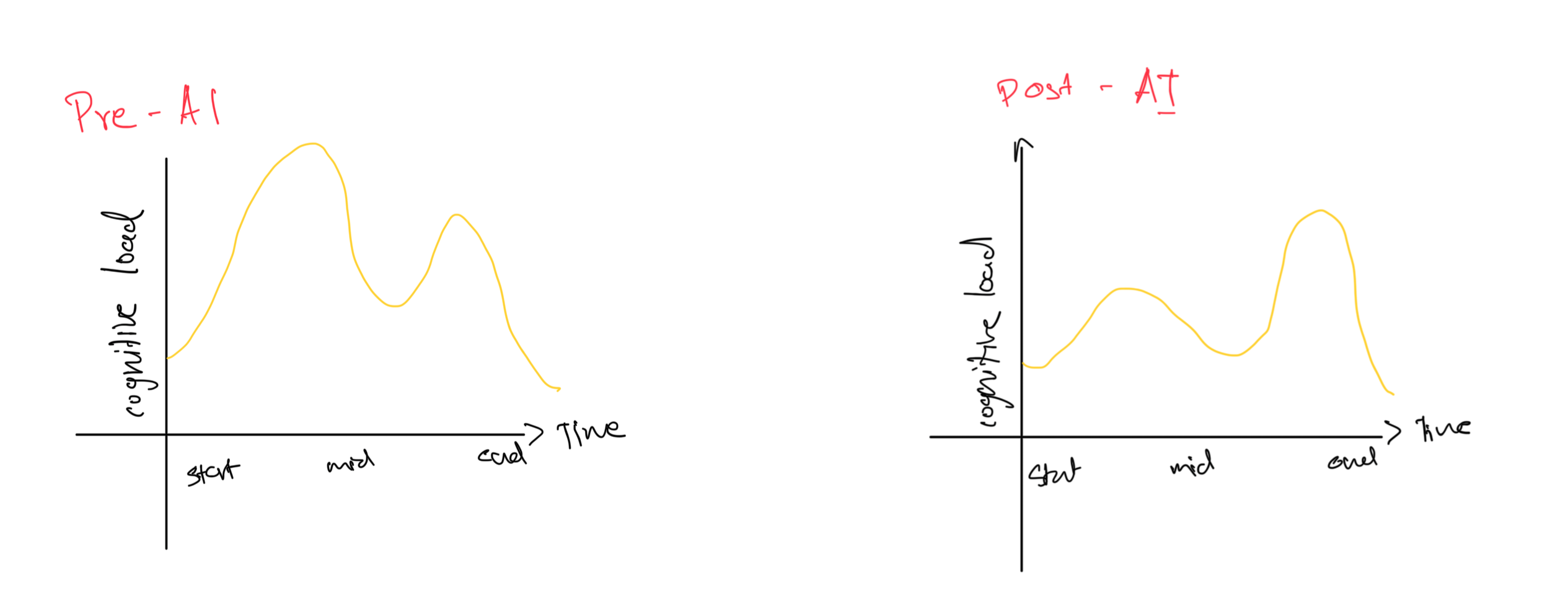
With AI in the mix, the overall cognitive load is noticeably lighter right from the beginning. That’s partly because I already had some context, but more importantly, the prompts themselves started acting like reference checklists—helping me quickly validate what needed to be done and keeping my mental overhead low.
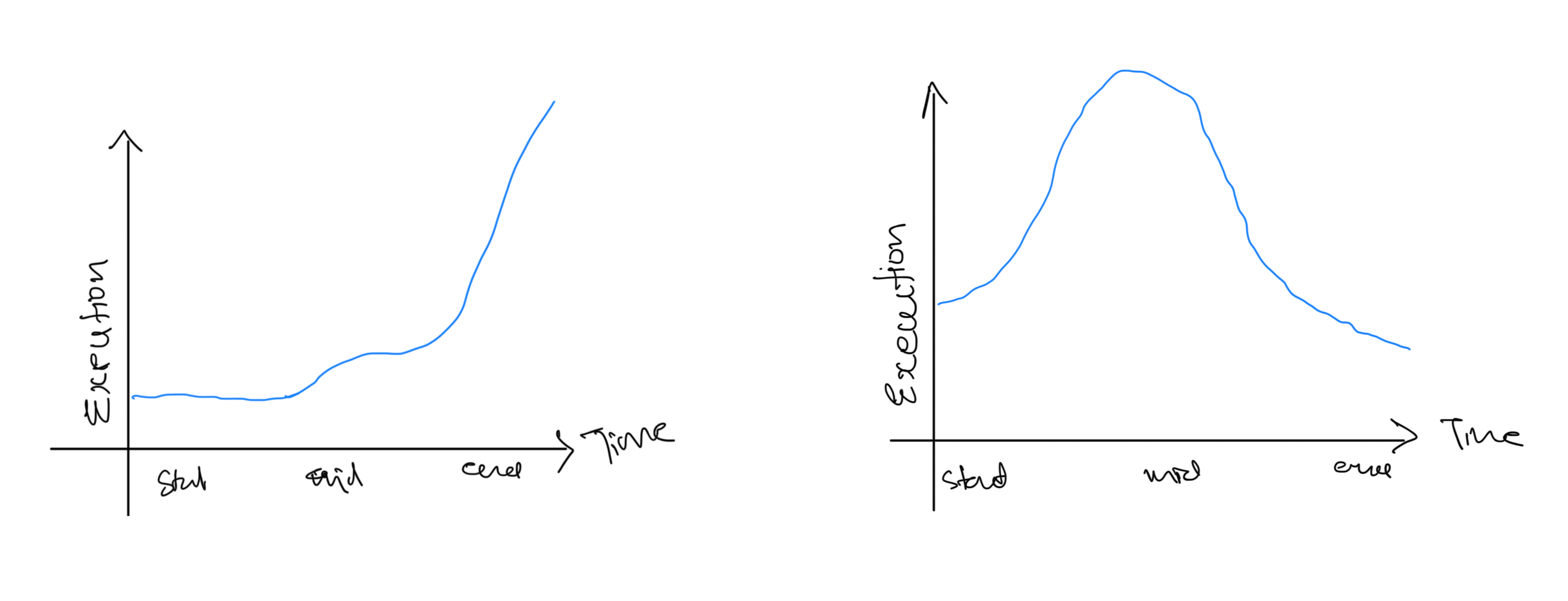
Previously, I’d tend to hoard a lot of information in my head. Since I could mentally visualize much of the code, it helped me move faster—but it also meant I had to power through long, focused coding sessions and be ready to handle all the tricky edge cases later on.
With AI, execution became more prototypical. Instead of writing everything upfront from zero to one, I’d ask Claude to generate scripts and populate models, allowing me to jump directly into building post-connections—skipping the UI layer entirely at first. Claude also helped me explore a few different implementation designs without sacrificing speed, which was especially valuable under a tight deadline.
The Good: Where LLMs Shine
Fundamentally, LLMs are pattern recognizers. They excel at memorizing our patterns and producing results based on them in a non-deterministic way.
- Database Models and Migrations: We follow strict patterns for database model definitions and migrations. This provides a large sample set for an LLM to quickly identify and execute. Even with generic prompts like “Add a model in the database to hold VendorProviderConfig details – it will have all the standard cols and provider – based on the list from providerConfigSources and a relationship with the VendorSuggestionModel,” the agent executes it almost perfectly. Similar consistency is observed when generating action handlers or GraphQL resolvers.
Importance of Well-Defined Patterns: I was initially skeptical about using AI for new flows, anticipating extensive code auditing. However, because our “Flows” are so organized in terms of definition, inputs, and outputs, it’s easier for me to evaluate correctness and for the AI to recognize and execute patterns. For instance, our temporal flow already expects a particular directory structure, specific file names, and certain exports, with steps defining their inputs and outputs. This structured approach has been a massive step up, though I still see a need for more human-readable error handling for expected prerequisites, making issues more actionable from the get-go.
- AI as a Replicator, Not a Thinker: Claude and JetBrains AI truly became co-pilot candidates because they consistently replicated code, not just in output, but in following my intentionally built patterns. If AI required me to constantly think about its output, I’d become the co-pilot. An LLM lacks critical thinking; it would agree if C++ and JavaScript were “fun to debug” if trained on enough datasets where people expressed that sentiment. The key is to invest time in designing patterns, then ask AI to write what you intend to code anyway, turning it into necessary boilerplate.
- Shorter sessions better overall result: Generally, using Claude or any other agent to do something in small pieces and terminating the session is usually much more consistent in delivering the intended code. If we leave the session open for too long and across multiple prompts, it will generally inherit a poor summary of a previous prompt or just be unable to perform the necessary changes with all the time it takes.
The Bad: The Pitfalls of AI Assistance
In certain scenarios, I’ve observed that LLMs are not without their drawbacks, especially when I haven’t guided them meticulously.
Picking Up Bad/Deprecated Patterns: One of the most annoying challenges is the LLM’s tendency to reproduce existing patterns, even if they are bad, deprecated, or incorrect. This happens because the pattern is easily observed by the AI, with no inherent indication of its current state or validity (e.g., consistently mapping entries in actions.js when it’s no longer necessary). Overcoming this requires very explicit instructions. It highlights my responsibility to recognize and correct such patterns, perhaps by adding more examples, updating instructions, re-writing prompts, or doing it manually. It also emphasizes the need for consistent and willful adoption of new patterns across our codebase, preventing mini-workarounds from spreading.
“Going Crazy” (Extended Exploration): Sometimes, the AI can take 20 minutes to explore without useful output. This waiting is unproductive and disrupts my focus. It suggests setting hard constraints on AI interactions, perhaps by breaking down requests into smaller chunks.

Reviewing a lot of code quickly builds tunnel vision: A prompt doesn’t always guard an LLM from not doing something. I frequently found myself missing simple cases when generating a lot of code that otherwise looked correct. For instance, in our database model, we define ENUMs, but in migrations, we create them as Strings. Claude, however, kept writing ENUMs in both places. While this is something we can avoid with better prompts, the key thing is that small discrepancies like these can easily slip through when the rest of the generated code appears good enough.
Incorrect (the agent kept emitting ENUM in the migration too):
provider: {
  type: DataTypes.ENUM(['GSUITE', 'ZIPHQ']),
  allowNull: false,
},
Correct:
// model
provider: {
  type: DataTypes.ENUM(vendorProviders),
  allowNull: false,
},

// migration
provider: {
  type: DataTypes.STRING,
  allowNull: false,
},
The Ugly: The Debugging Nightmare

The most counterproductive aspect I’ve identified has been debugging AI-generated code.
Increased Debugging: In parts of the codebase where data flow is unclear or side effects are buried, asking AI to generate changes doesn’t inspire immediate confidence—because you’re not entirely sure what’s going on either. You end up validating AI output line by line, not because you distrust the model, but because the surrounding context is shaky to begin with.
The problem is, debugging in these areas is already hard. So instead of saving time, AI ends up compounding the effort—I spend more time untangling assumptions, tracing props, and double-checking whether something “might” work, which defeats the point of using it in the first place.
For instance, I’d find myself asking:
- Why do we have duplicate mapping of this object at multiple places?
- What does this property do?
- Why do we need to pass the data from so many components?
- Are these flags being used anywhere else?
Opportunity in Contextual Understanding: LLMs, being non-runtime tools, can’t inherently validate code against runtime failures or complex business logic—unless we explicitly provide patterns for validation (like form validators or assertions). This isn’t a limitation of the LLM itself, but a reflection of how we interact with it. The opportunity lies in improving the context we feed it: the clearer our guardrails and expectations, the better the model performs.
In our frontend, for example, we often take a small unit of value, apply multiple transformations, and render it in the UI. But at no point do we assert that the input matches what we expect. Take integrationCategoryMap—it assumes the category is present as a precondition for the integration, but there’s no code-level assertion to catch violations. Without these signals, LLMs have no way to understand what must be true for the flow to succeed.
We can work around this by writing prompts carefully—but natural language alone isn’t a spec. It’s not enough to define how APIs or components are meant to interact. Claude (and others) can pick up some of these expectations if the code and patterns make them explicit. Without that, prompting alone falls short.
Getting the Schematics Right: While AI helped me get around things quickly, the way the code was written was often unsettling and questionable to my taste. I ended up rewriting some of it and tweaking many more places to get it right. I think this is something that will be solved pretty quickly as we develop more closely coupled patterns. However, it also takes away an engineer’s ability to pause and question their code. I’m already seeing this in many places: things could have been written in a simpler and saner way, but getting to the result became much more important. The problem with this is that it just creates a large piece of code from an unopinionated engineer, which takes away the questioning and reasoning of doing something or writing something a certain way.
Lessons Learned and Moving Forward
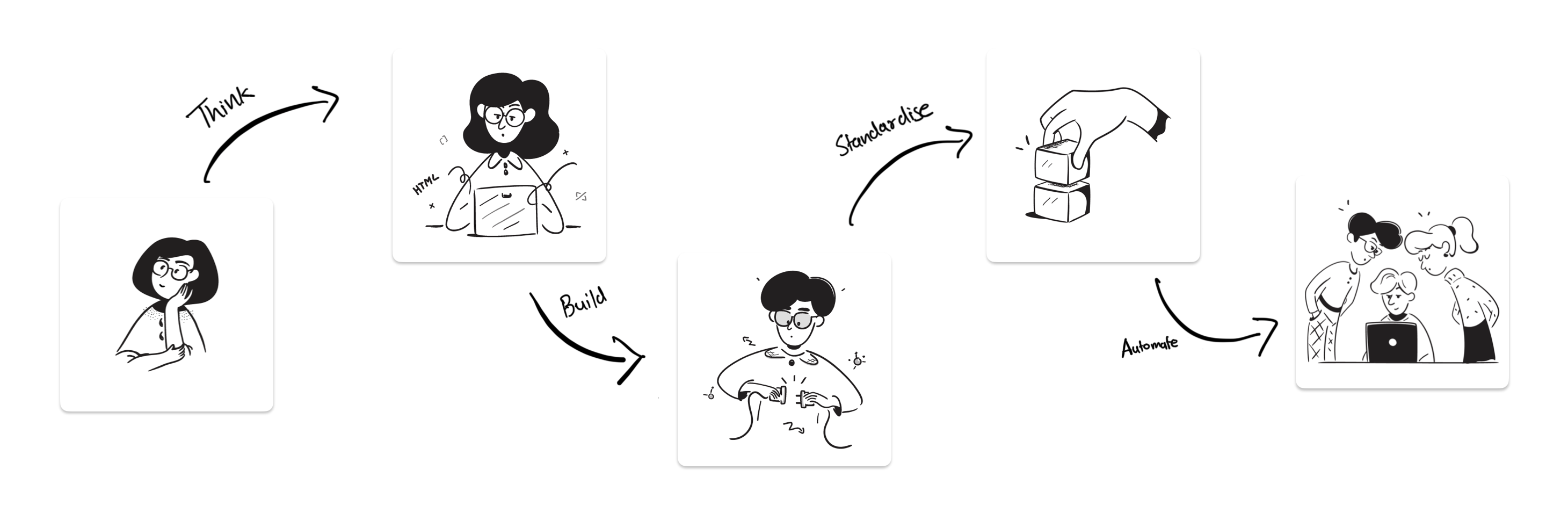
In my experience, for maximizing LLM efficiency in coding:
- Building in Patterns: The most effective approach is to design and establish clear patterns (e.g., wire framing, modeling problems, building pipelines) and then let the AI replicate these steps.
- Shorter sessions better overall result: I’ve found that using Claude or any other agent for small, focused tasks and terminating the session afterward generally leads to much more consistent and intended code. If sessions are left open for too long or span multiple prompts, the agent tends to inherit a poor summary of previous prompts or struggles to perform necessary changes, despite the time it takes.
- AI as a Stop-Gap to Take Out Time to Refactor: LLMs can free up my time by handling boilerplate around poor abstraction, allowing me to focus on refactoring areas I find difficult to debug or reason about. Debugging ease, for me, has become a key metric for code quality.
- Absolute Clarity on the Basics of Data Flow: Moving towards a more declarative approach is essential, where our code explicitly defines inputs, outputs, and prerequisites. Relying on implicit assumptions or generic
TypeError/ImportErrorwon’t work well for AI, as it lacks runtime context. - Automating Smaller Chunks with Consistency > Major Flows: Given LLM context limitations and the growing complexity of our codebase, I’ve found it far more effective to automate small, repeatable chunks than to ask AI to generate full-blown flows. I don’t want to spend brain cycles writing Forms, Drawers, Resolvers, Mutations, Monitors, or Defining Icons—they’re solved problems at this point. When I used Claude Code and Gemini 2.5 Flash, it was honestly a relief. I could skip straight to handling how to send and save the API key for the integration—instead of scaffolding a Drawer or building out a form. Sure, I still had to tweak a few things, but the real friction wasn’t in the AI output—it was in the gaps and missing assumptions that the codebase never documented.
- Documenting My Code, Opinions, and Pain Points: Adding comments (e.g., JSDoc, simple inline comments) that express my architectural opinions, design choices, or known pain points can serve as “safeguards” for LLMs. These comments implicitly guide the AI, helping it inherit context and avoid undesirable patterns (e.g., preferring a function-based approach, ensuring components return objects, avoiding argument mutation). For instance, in ZIP, we allow fetching vendors based on categories. By default, the selected option in the design is “No Categories,” which actually means nothing is scoped, so we get everything. However, looking at it in isolation can be confusing. I added a small comment expressing my opinion, and it is what it is. I think these comments and opinions will eventually become safeguards for LLMs and examples of things not to do when it’s building a plan.
- Improving Upon My Teammates’ Prompt Structure: The current prompt structure (Markdown files with input JSON) works well, helping me get boilerplate for flows in minutes with custom attributes—it’s really an interesting way to write prompts. The only missing piece is validation. If we can build a prompt flow to communicate with the LLM to bail out if certain structures or conditions are not met, or throw an error instead of continuing to try and make it work.