 Ampliflare Audio Guide
 What Is an Opus File? The Audio Codec Explained
Opus is an open audio format that sounds better than MP3 at the same file size. Here's what it is, where you'll meet it, and how to open and convert it.

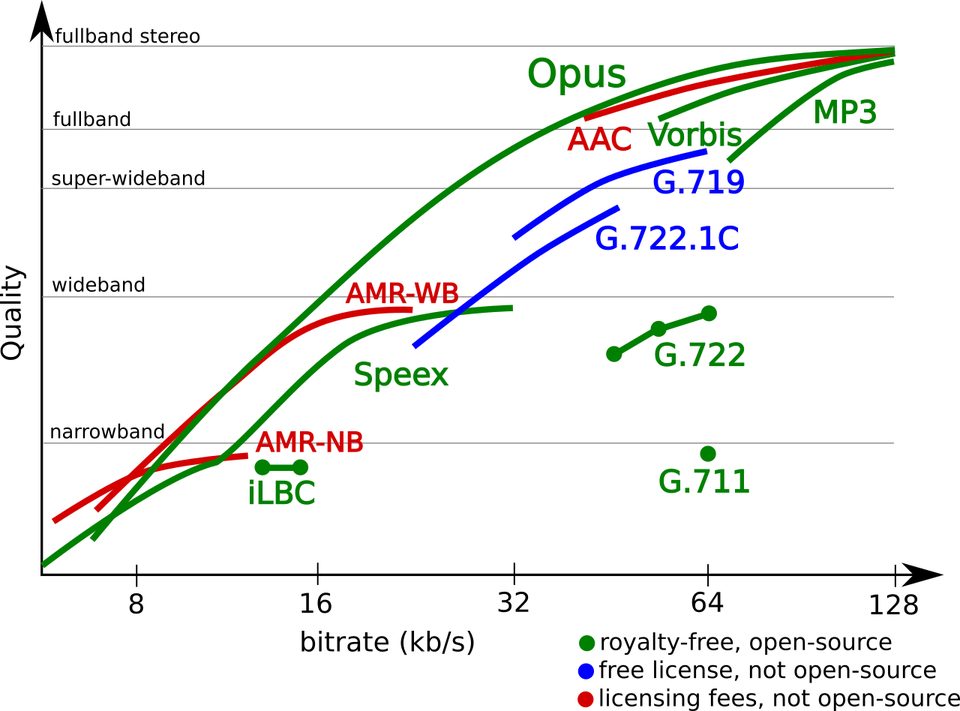
An Opus file is a compressed audio file that holds a lot of sound quality in a small space. It is the codec behind calls, game chat and many modern streams, and more people hear it every day than know its name. It is also open and royalty-free, so any app can use it without paying a license fee.
If you met a .opus file and wondered what it is, whether it sounds good, and what to do with it, this guide answers all three.
What Opus is
Opus is an audio codec: the software inside the file that compresses sound on the way in and rebuilds it on the way out. The Internet Engineering Task Force standardized it in September 2012 as RFC 6716, after folding two older codecs into one. Skype’s SILK handles speech well, and Xiph.Org’s CELT handles music with very little delay. Opus picks the right one, or mixes them, depending on what is playing.
The format is wide. It works from 6 to 510 kbit/s, covers narrowband phone audio up to 48 kHz full-bandwidth music, and switches frame sizes from 2.5 to 60 milliseconds. It supports constant and variable bitrate, and anything from mono to many channels. It replaced the earlier open formats Vorbis and Speex for new work, and the reference implementation, libopus, is still actively developed (version 1.6.1, January 2026).
Why it sounds better at the same size
The short version: Opus was designed with modern math, and it changes strategy mid-file. For speech it models how the voice is produced. For music it uses a frequency transform. A single file switches between the two constantly, and it is built to survive lost network packets too, which is exactly what calls need.
Published listening tests rank Opus above MP3, AAC and HE-AAC at the same bitrate, until the bitrate climbs high enough that the differences disappear. The quality chart on the Opus site shows the gap at a glance. In practice this means a 96 kbit/s Opus file often sounds as good as a 128 kbit/s MP3, which is why so many services make it the default.
Where you will meet it
Opus is the audio format of the real-time web. WebRTC, the standard browsers use for calls, requires it. Apps that picked it for calls and chat include Discord, WhatsApp, Zoom, PlayStation party chat, in-game voice chat and SteamOS streaming.
A file saved as audio only usually ends in .opus and is wrapped in the Ogg container, defined in RFC 7845. The same Opus audio also rides inside other containers under other extensions: .webm video files, and .mkv or .mka Matroska files.
How it compares with the formats you already know
| Format | Type | Where you usually see it |
|---|---|---|
| MP3 | Lossy, 1990s design | The compatibility baseline, plays almost anywhere |
| AAC | Lossy | iTunes, Apple devices, many video platforms (.m4a) |
| Opus | Lossy, modern | Calls, game chat, streaming, .opus files |
| FLAC | Lossless | Archiving and listening to originals |
MP3 and AAC made sense for their time. Opus gives more quality per bit than both, and FLAC keeps every bit of the original but makes large files. For finished audio you want small, Opus is the best of the lossy options. For a master you keep, use FLAC or WAV.
How to open an Opus file
1. Drop it into a browser. Firefox, Chrome and Edge have played Opus for years. Drag the file into a window and it plays. Safari has used Opus in calls for a long time, but it only plays .opus files in Ogg containers from version 18.4 (macOS Sequoia 15.4, iOS 18.4), so older Apple software may refuse them.
2. Play it in a media player. VLC opens .opus on Windows, macOS and Linux, and Android has played .opus files natively since Android 10.
3. Convert it when you need another format. Ampliflare Audio, the app this site’s noise removal guide walks through, opens opus inputs and writes mp3, wav, m4a, flac, ogg and opus. Install it (see Getting started), click Open Files…, add the file, pick Convert in the sidebar, choose the format and quality, then click Run. Your original is never changed; the result is a new file next to it.
When it won’t help
- The oldest devices and strict hosts. A 2010s car stereo, older Apple hardware, and some podcast hosts and editors still expect MP3. When the destination is unknown, MP3 remains the safest umbrella format.
- Repeated re-encoding. Opus is lossy, like MP3 and AAC. Convert once, from the original file, and keep the original. Re-saving opus to mp3 to opus piles up damage each time.
- Lossless archiving. If you must keep every bit of a recording, FLAC or WAV is the right choice, not Opus.
Takeaways
- Opus is an open, royalty-free codec that gets the most quality per bit among common lossy formats.
- One format handles speech and music, live calls and stored files.
- Most devices and browsers play it; keep MP3 only where compatibility forces it.
- Convert once, from the original file, and the format choice stops costing you quality.
Questions
Is an Opus file lossless?
No. Opus is a lossy format, like MP3 and AAC. At high bitrates the difference is hard to hear, but FLAC or WAV keep every bit of the original.
Is Opus free to use?
Yes. Opus is open and royalty-free, so apps use it without paying license fees. That is a big reason calls and games adopted it so widely.
What opens an Opus file?
Modern browsers, VLC and most phone apps. Android plays .opus natively since version 10, and Safari 18.4 or newer plays it on iPhone and Mac. Ampliflare Audio opens it and converts it to other formats.
Read next
- Ampliflare Audio 1.0: Offline Noise Removal, Now Open SourceAmpliflare Audio 1.0 strips background noise from speech on your own computer, on Mac, Windows and Linux. The same day, its source went public under the AGPL.
- Ampliflare Audio 1.0Ampliflare Audio 1.0 lets you choose where results go, rebuilds the Split tool and adds licenses for commercial use. 1.0.1 bundles ffmpeg and makes the source public under the AGPL.
 Best Sound Repair Software for Damaged RecordingsRepair recorded audio by matching the damage to the tool: steady hiss and hum, clicks and crackle, or clipped peaks. Four picks compared, free and paid, October 2026.