 Calibre Zen Alternatives
 Calibre Alternatives: Same Books, Different Tools
Most calibre alternatives are front ends or readers, not full replacements. Here is what each one actually keeps, and when staying on calibre is the smarter pick.

The short answer
calibre keeps the most complete toolchain, so the honest answer is to stay on it unless one thing gets in your way. Pick Calibre Zen when the interface is that thing, Calibre-Web Automated to read from a browser, Kavita for comics and manga, or Koodo Reader for one reader everywhere.
| Aspect | Calibre Zen | calibre | Calibre-Web Automated | Kavita | Koodo Reader |
|---|---|---|---|---|---|
| What it is | calibre with a new interface on top | The original ebook library manager | A web front end for a calibre library, with automation | A self-hosted reading server for ebooks, comics and manga | An ebook reader that runs on every device |
| Where it runs | Windows, macOS, Linux | Windows, macOS, Linux | In a browser, served from Docker | In a browser and apps, served from Docker | Windows, macOS, Linux, Android, iOS, web |
| Your calibre library | Opens it as it is | It is the calibre library | Reads it from a mounted folder | No, Kavita keeps its own library | No, Koodo keeps its own library |
| Ebook formats | Same as calibre | Dozens, with conversion between them | calibre's formats, with automatic conversion on ingest | EPUB, PDF, CBZ and manga | 15+ formats, including EPUB, MOBI, AZW3 and PDF |
| Metadata editing | calibre's editor, restyled | Full editing, tags and search | Edits in the web UI, written back to the files | Edits in the web UI, from file names and ComicInfo.xml | Basic editing in the app |
| Best for | A calmer interface on calibre's features | The complete toolchain | Reaching your library in a browser | Comics, manga and shared reading | One reader on every device |
| License | GPL-3.0, wraps calibre | GPL-3.0 | GPL-3.0 | GPL-3.0 | AGPL-3.0 |
| Price | Free | Free | Free | Free; Kavita+ is $4 a month (optional) | Free, with a paid Pro tier |
calibre is the most complete ebook library manager there is. Nobody leaves it because of missing features. People leave because the interface fights them, because the app only runs on a desktop, or because half the library is comics.
So the honest framing first: most calibre alternatives are not replacements. They are front ends for a calibre library, or separate readers with their own library. Only Calibre Zen keeps the whole calibre toolchain. The rest trade features away, on purpose, for something calibre does not do well.
What you give up when you leave calibre
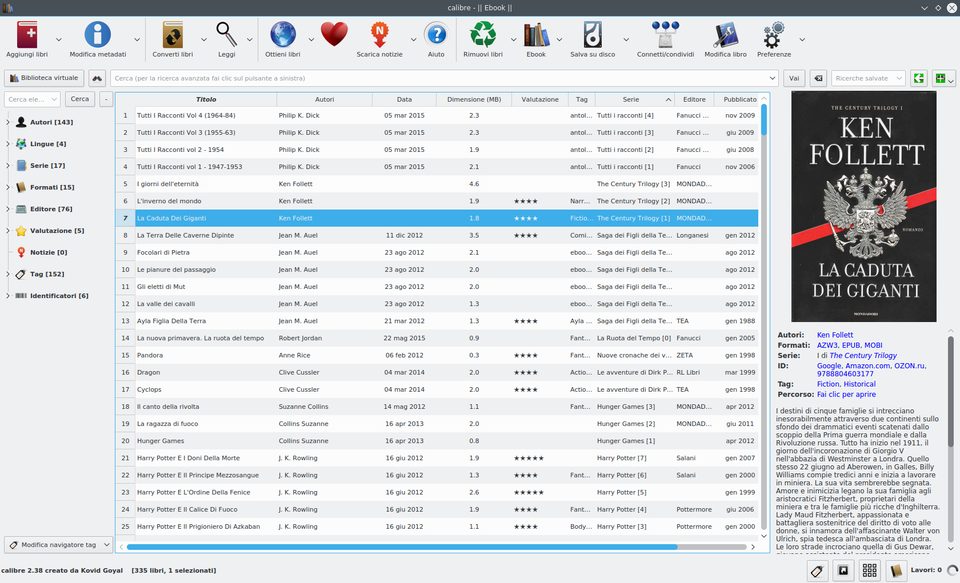
Before picking a tool, know what calibre actually does. It manages the library and downloads metadata. It edits metadata and converts between dozens of file types. It has a built-in ebook viewer, a news downloader, and a content server that streams your books to any device. It supports almost every ebook reader on the market.
Calibre Zen and Calibre-Web Automated read your existing calibre library. Kavita and Koodo Reader keep their own, so you manage metadata in a second place.
Calibre Zen: calibre with a calmer interface
Calibre Zen is calibre with a new interface on top. It wraps calibre’s own release binary instead of editing calibre, so the library, the plugins, the formats and the conversion pipeline are all still calibre’s. Your calibre install stays untouched, and both apps can open the same library, one at a time.
Version 0.3.0 is on calibre 9.15.0. The theme is consistent: six colour schemes, redrawn icons, light, dim and dark. The tag browser becomes a filter panel, the book list gets a preview pane, and the reader opens a book in about a tenth of a second because it is ready and waiting.
Pick it when calibre’s interface gets in your way and you want nothing to change underneath. If you rely on plugins that restyle the app, or you want each new calibre version the day it ships, stay on stock calibre. The full comparison lives on Calibre Zen vs calibre.
Calibre-Web Automated: your library in a browser
Calibre-Web Automated is a web front end for a calibre library, built to run in Docker. You point it at a folder with your calibre library and it serves the books in any browser, on any device, behind your own login. It is GPL-3.0 and free.
The automation is the point. It ingests new books from a watched folder, converts formats automatically, fixes broken EPUBs, fetches metadata on ingest, and can email new books to your reader. It syncs reading progress with KOReader and Kobo, and supports OAuth 2.0 and OIDC logins instead of a shared password.
Pick it when your library lives on a server and you want to reach it anywhere. It is not a desktop editor: heavy metadata work and bulk conversion still belong in calibre, which can run on the same machine.
Kavita: for comics, manga and shared reading
Kavita is a self-hosted reading server for EPUB, PDF, comics and manga. It keeps its own library, so you point it at a folder of books and it scans metadata from file names and ComicInfo.xml. Its built-in readers handle single pages, double spreads and webtoon mode.
It has OPDS, reading lists, user accounts with age restrictions, and annotations that export to Obsidian. The core is free and open source (GPL-3.0). An optional Kavita+ plan costs $4 a month and adds progress sync, recommendations and automatic metadata.
Pick it when a big part of your collection is comics or manga, or when several people share one server. It does not convert formats, so it works best alongside calibre for the heavy lifting.
Koodo Reader: one reader on every device
Koodo Reader is an ebook reader with its own library, licensed AGPL-3.0. It runs on Windows, macOS, Linux, Android, iOS and in the browser, and reads 15+ formats including EPUB, MOBI, AZW3 and PDF. That reach is its reason to exist: the same library, notes and highlights follow you across every device.
Koodo syncs through the cloud service of your choice: OneDrive, Google Drive, Dropbox, WebDAV and more, or self-hosted through Docker. Annotations, text-to-speech, translation and a built-in dictionary come with it. There is a free tier and a paid Pro tier.
Pick it when you read on many devices and want one consistent reader. It is a reader, not a manager: metadata editing is basic, and there is no format conversion or news download.
Also worth knowing: Foliate
Foliate is a GTK ebook reader for Linux, GPL-3.0, packaged for Arch, Debian, Fedora and openSUSE. It opens EPUB, Mobipocket, Kindle, FB2, CBZ and PDF, stores bookmarks and annotations in plain JSON files you can sync yourself, and supports right-to-left and vertical text. A good fit for Linux readers who want a native, distraction-free reader beside calibre.
When staying on calibre is the smarter pick
Stay on calibre when you use its rare features: the ebook editor, the news downloader, device syncing, or years of curated metadata and conversion profiles you depend on. Plugins and workflows are calibre assets that a reader cannot carry over.
The pattern to take away: an ebook alternative is rarely a calibre replacement. Decide which one thing calibre does badly for you, and pick the tool that fixes exactly that.
Questions
Is there a real calibre alternative?
Not one that keeps calibre's full feature set. Calibre Zen keeps the whole toolchain because it wraps calibre itself. The other tools here are front ends or readers that trade features for reach.
Can I use my existing calibre library with these tools?
Calibre Zen and Calibre-Web Automated can read your existing calibre library. Kavita and Koodo Reader keep their own libraries, so you import your books and manage metadata in the new tool.
What is the best calibre alternative for comics and manga?
Kavita. Its readers handle single pages, double spreads and webtoon mode, and it scans metadata from file names and ComicInfo.xml.
Read next
 How to Convert MOBI to EPUBConvert a MOBI ebook to EPUB in calibre or Calibre Zen: add the book, pick the output format and profile, end up with a real table of contents, and send it to your reader.
 How to Convert MOBI to AZW3Convert a MOBI ebook to AZW3 (KF8) in calibre or Calibre Zen: check what your file really is, set the output format and a Kindle profile, and move it to your Kindle by USB.
 What Format Are Audiobooks In? M4B, MP3 and AAXAudiobooks come as M4B, MP3 or Audible's protected AAX, and streaming apps give you no file at all. Here is each format, how to check what you have, and what plays it.